Category: Articles

Articles you can find only on this blog

Parade Magazine interview with Stephen King

I just finished reading this article in the physical Parade magazine in the Sunday paper:

http://www.parade.com/15671/kentucker/summers-best-books-starring-stephen-king/

This is why I still respect and admire Stephen King so much: he’s still writing, still doing what he loves, and doesn’t care what anyone thinks of him “as long as the checks don’t bounce”. He’s passed on his values to his children successfully, and both of his sons are published authors. Dedicated writer, family man, strong literary values – that’s what I want for myself. It’s a good interview; I’ve always been sucked in by the way King talks, and there’s some bonus material at the link.

>Household Finance, Part II: The Ledger

>When it comes time to balance your checkbook, do you cringe in fear? Does your heart fall into your lap when you pull a folded, crumpled wad of receipts out of your wallet or purse and realize ‘oh no, what do I do with all of this?’ In this second part of a two-part series on accounting and finance at the household level, I’ll explain both the old-fashioned and the newfangled ways of balancing your checking account, as well as the methods I use for hiding money within the ledger itself for a more transparent way to save and/or cushion your spending habits.

The old-fashioned way:

Type: paper
Difficulty level: 8

Materials required:
A checkbook ledger
One or two highlighter markers
An old-school ball-point pen
Calculator
Every Saturday morning for the rest of your life

Nobody ever said that keeping a ledger was difficult, and the way that we’re traditionally supposed to do it really isn’t so hard (except for those who don’t like to do them.) However, I started the joint checking account with the mindset that I have to do it right or everything is going to tank and I’m going to end up having to fix it. With money. Here’s a page from my old ledger: click it to see the large version.

Photobucket

So, does this look difficult? It might; I admit that every receipt, bill, and transaction that went into this ledger added five minutes to the process. I had to check and re-check every calculation, but this was how I did it. I highlighted the deposits just for visibility, but that’s not the weird thing about this ledger, is it? Take a look at the bills entries and you’ll see where I put my own spin on the process. In Part I of this series I said that the Save for bills amount in the budget is subtracted from the available balance of the account, and this is how I did it. I needed a way to keep our spending (grocery) money separate from our saving (bill) money without using a separate account. This is also how I hid half of my bi-weekly paycheck in my personal ledger.

The first time, I just did a Bills/Bill money out entry, subtracted the bill money, and X’d out the posted column (where you check off when the transaction has posted.) The following week, I brought that money back in with a Bills/Bill money in entry, pay the bills from it, add the current week’s bill money, and then “bill out” the result. The trick to making it easier is in not putting receipts from spending money in between the bill money transactions, and highlighting the bill money transactions so you can easily find them. Here’s the step-by-step process I developed over the first month or so:

  1. enter the spending money receipts
  2. Add in the deposits
  3. “Bill in” the amount billed out the previous week (using the Bills/Bill in entry)
  4. Pay any bills
  5. Get your calculator ready
  6. Take your billed in amount, subtract the bills you just paid, and add in the amount you are saving for bills this week. The resulting number – which is hopefully a positive one – is the amount you “bill out” (using the Bills/Bill out entry.)

If the bill out amount is a negative number and you did everything right, then you should know why it’s negative and it shouldn’t be a problem – if you’re running a surplus, then you should have some cushion for that, and it will fix itself the following week. At least, that’s how it worked out for me the one time it happened in the past year. If you don’t have a surplus cushion, then call someone and tell them you have to pay your bill late, and don’t be afraid to admit that your budget went wonky; companies appreciate it when you let them know in advance that you can’t pay on time.


The newfangled way:

Type: spreadsheet
Difficulty level: 5

Materials required:
A computer
Microsoft Excel, OpenOffice Calc, or some other spreadsheet program
A few minutes here and there, maybe twenty minutes once or twice a month.

There’s a safe feeling to having your ledger on paper, until you realize that you’re holding on to an anachronism. For one thing, most – if not all – banks keep track of your account and give you online access to your transactions, statements, and everything else. This is how I would balance out the ledger. For another thing, if you have a computer and can use a spreadsheet, you can make a new kind of ledger that is much more flexible and accessible, and that is self-calculating. (Again, clicking the picture makes it easier to examine.)

  Photobucket

 I should have mentioned in the previous post that when I make a spreadsheet that will eventually have more than twenty rows to it (like a yearly ledger) I freeze the sheet headers. To do this in Excel you highlight the row below where you want the split to be, go to the Window menu and click Freeze. Then, when you scroll down the sheet, the headers stay at the top. Don’t use the Split option; that will take care of itself. What you see in the new ledger looks a little more complex, but it’s really much more organized and simpler to use once you understand the layout. It’s laid out in three sections: Transactions, Allocations, and Balances.

Transactions:
This section should look like part of your ledger, literally. I began using spreadsheets for my ledgers just this past month, so it’s new. Since then, I’ve had to add columns for the date and posting status of transactions in this section, so my actual ledger template looks a little different now. It’s self-explanatory, and the amounts in this section are actual transaction amounts.

Allocations:
This is where all the action is. I’ve created three separate allocation accounts within the account itself using a single spreadsheet. Does that sound weird? It’s no different than partitioning your hard drive, really; these are virtual account partitions. I have, from left to right, the Available Balance (AB), the Bills Balance (BB), and the Savings Balance (SB). AB is for grocery money, BB is for bills (of course,) and SB is for the surplus and savings. Doing it this way has some advantages:

  • I can split up transactions in a single line, which cuts down on entries.
  • I can see all three balances at once – no need to search and interpret a paper ledger.
  • This method obsoletes the surplus breakdown box in the budget sheet – now we can see the changes on a transactional basis, and we don’t need to spend time figuring out where the surplus came from.
  • Technically, I’m no longer hiding money; now I’m allocating it.

The three columns in this section headed “XX Amount” are where I enter amounts for something. Most of the entries come out of the grocery money (AB), because they’re for groceries. Nothing comes out of SB because we’re saving it. The bills make it interesting, though. I mentioned in the last post that I over-allocate for bills by taking what I expect it to be and rounding it up to the nearest dollar (or some reasonable amount, like the next nearest five dollars for the water bill.) This means I have saved more money than I’m going to spend on bills, and of course I put the extra bits into SB. So where bills are paid, as you can see, I withdraw the entire allocation for that bill from the BB and credit the extra into SB in a single line. Likewise, when I add in budget contribution deposits, I split them into all three balances accordingly (note the last entry.)

 The three balance columns in this section are calculated with formulas. It’s a simple =X15-W16 type of formula that takes the previous balance and subtracts the amount I’ve entered on the current line. I fill down these three columns (highlight some cells, including the last one with the formula in it; Edit/Fill/Down) as the sheet progresses.

Balances:
The last section of the ledger contains balances, and should never have to be touched once it’s set up. This section serves two functions:

  1. It allows me to see the account balance as it will appear on my bank’s web site, and
  2. It allows me to visually verify the amount of the transaction without having to check and re-check on a calculator.

Both columns are formulated and filled down as the sheet progresses. The Amount column is the sum of the three XX Amount columns that are hand-filled in the Allocations section with a formula that looks like =G50+J50+M50 at line 50. This column’s sole purpose is to provide verification that the amount I’ve allocated is the actual amount of the transaction (which I would have hand-filled in the Transactions section.) If I visually compare the two amount columns, this prevents me from making accounting mistakes. The Gross Balance column, on the other hand, is the sum of the three balance columns in the Allocations section with a formula that looks like =H50+K50+N50 at line 50. This line reflects the account’s actual balance.

The spreadsheet ledger has proven to save me time and effort, while allowing me a better way to allocate our money and track the balances of those allocations. All in all, I like it much better than keeping the paper ledger, plus making corrections aren’t a headache. The use of a spreadsheet also makes the budget and ledgers accessible; I synchronize those sheets with an online storage account so that I can access them anywhere, including on my iPad and my Android phone. When Karisa texts me to ask how much we have left for groceries, I can check it and give her an exact amount. Plus, I can enter receipts on the go without having to keep the checkbooks with us, which will make our trip to Detroit this Summer much easier to manage.

If you have any questions or comments, feel free to do so by adding a comment. Thanks for reading!

>Household Finance, part I: The Budget

>Let’s face it: one of the most important things we can do to ensure that we’re running a successful household is making a budget. Whether we own our home or are renting a home, flat, or apartment, keeping track of the bills and making sure that we are setting aside enough money to pay them is a skill that goes a long way toward giving us peace of mind. This is part one of a two-part series about the way I handle accounting and finance on the household level.

Before:
Karisa and I used to pay things out of pocket, splitting the bill and getting it paid on time. This was a drag, because I would put the bill on my desk and then remind her that I need the money for the bills on payday; then I’d have to deposit the money so I could write a check. There would be weeks when we had no money because the Internet bill and the phone bill were due at the same time, we had to buy groceries, cat food, and cat litter, fuel for our car, and then we were wiped clean out.

One day, I proposed that we make a budget. This was an idea that Karisa had brought up before, but I had to get an idea of how I would do it in my mind. I sat down and drew it all up on a piece of paper, with a calculator, and showed her what I had come up with. The plan looked good to her: each week, both of us would put in a set amount of money to the joint checking account; the bills would be paid on time, and there was money set aside for groceries.
I ran the budget for about six months on paper before I sat down on a Saturday morning and made a spreadsheet template (mainly so that I wouldn’t have to spend half an hour setting up the paper sheet anymore, but also to save the planet.) This is what it looks like (click it to see it bigger):

Photobucket

I love using spreadsheets for this purpose, primarily because you can have it calculate your budget for you; all you have to do is enter numbers. I’ve gotten to the point where I can make six months of budgets in advance, giving them the rare tweak if necessary. This is the layout I use:

The top portion:

The top portion is for essential data. It takes into consideration paydays, expenses; and money coming into and leaving the budget. Some of this information is now what I would call “legacy” – a euphemism for “possibly unnecessary to my strategy at this time,” but I like to stick with what works until I’m sure. Here’s a section-by-section breakdown from left to right:

Paydays: I originally did this because I would put in two weeks’ contribution at a time because my pay comes every other week. Eventually I developed a way around this that involves hiding half of my pay in my checking ledger (you’ll hear more about this strategy in the next part of this series) so that I can contribute on a weekly basis. This has since made things much easier, and the paydays section is like an arcane law that nobody realizes is still on the books. Eventually I’ll take it out, but I just haven’t yet because I use it to fill in the dates on the weeks sections. Isn’t that a weak excuse?

Expenses: We originally used all three lines in this section, but now we have two cars and so we each pay for our own gas. The “Other” line was one I put in for cigarettes because we used to share packs, but we both quit last year, so I left it in just in case we need to budget something in on a short-term basis. These three lines are formulated into the “Each pays” and “Save for bills” lines in the weekly sections in the bottom portion of the sheet.

Bills: This is where I document allocations for bills. I usually take the bill from the previous month, round it up to the nearest dollar, and put the amount in the appropriate box. The due days are the same from month to month, so they’re in the template. Obviously, this works best if the bills don’t fluctuate too wildly; but if you allow for a surplus cushion, the practice of allocating the amount from the previous month’s bill should help offset any modest, unexpected overages. When the bill goes back to normal the next month (hopefully) you will be able to reclaim the lost surplus from the over-allocation of the bill. Trust me, it works.

Budgetary input: This is important. When you have bills due in the middle of the month, but you do your budget a month at a time, you might have money leaving the previous month’s budget and coming into the current month’s budget to pay for those bills. For us, the three bills shown all carry over, and so require special treatment in the weekly sections in the bottom portion of the sheet. This is also where I keep track of the budget surplus and it’s growth or shrinkage from the previous month (this might change soon, as I have designed a new expanded account ledger to take over this function). The “Total in:” line below the box calculates the four amounts lined up above it with a simple =SUM(M4:M7) equation.

Budgetary output: This is the yang to the input’s yin. Obviously, it’s the money leaving the budget to go to the next month’s budget. I don’t fill in the surplus until the end of the month because honestly, I don’t know how much it is until after the last Friday of the month. Again, the total line under the box is a =SUM(R4:R7) calculation of the four lines above. The numbers in the box get entered into the input box of the next month’s budget.

The bottom portion:

The bottom portion is where I calculate the allocation of each week’s contributions and keep pertinent notes. Here, the devil is in the details; that’s the reason I chose to switch to a spreadsheet – to reduce the possibility of human error – but it doesn’t mean one shouldn’t double- and triple-check the budget before using it.

The weekly sections:
Depending on the month, there will be four or five weeks ending in Friday. Because my wife gets paid weekly, I opt to do the budget on a weekly basis. If I were single, I could reasonably switch this budget to a two- or three-week budget because that’s how many times I get paid in a month. But if I were to ask my wife for three or four hundred dollars every other week, she would end up miserable and then so would I. So, needless to say, it’s better to tailor the budget to the highest pay frequency in the household. One solution, like I mentioned in the Paydays section, is to have the person with the lower pay frequency pay in multiple weekly contributions (because that makes sense). I found a more elegant solution, but it might just work for me because it’s my pay and I take care of the budget, too. Either way, there has to be a lowest common denominator for making contributions to the budget, and the easiest time for a person to part with a chunk of their loot is on payday.

When I set up the budget, I fill in all the values for the bills that are lined up under the date (each date being a Friday of the month.) There was, originally, a reason for the break in the bills section. it was intended that bills that were accounted for only within the month itself were in the top group and bills that had money rolling in from the previous month were in the bottom group, but when I added in Hulu Plus in November I accidentally stuck it in the bottom portion and haven’t fixed it yet. I calculate each week’s contribution for all of the bills in the top group (and Hulu Plus) by taking the allocation amount in the Bills section and dividing it by the number of budget weeks in the month (in the illustration’s case, that’s four.) This way, the bill is saved for throughout the month. I fill in the values myself, because it’s pointless to put in formulas when the number of weeks can change from one month to the next. The bills in the bottom group (except for Hulu Plus) get calculated like this:

(Allocation – (budgetary input amount)) / (number of weeks until the bill is paid)

Take Verizon, for example.

($195 – $48.75)/3 = $48.75

It makes sense, because I calculated the amount that I would need from one due date to the next on a weekly basis in the previous month (this is why I now do several months at a time – because it’s a flow.) So you can reasonably assume that I only paid in one week on the previous month. But don’t take this for granted by just using that number again – always re-calculate when making the next budget. Then check it, and check it again.

The column of bills in each weekly section (or each period) is formulated with the grocery money from the Expenses section in two amounts that are crucial to the budget:

Each pays: This is self-explanatory. My wife and I both deposit at least this amount into the joint checking account every Friday. This is the exact formula I use: =(SUM(B17:B20)+SUM(B22:B25)+SUM(E4:E6))/2

Essentially, the sum of the top group of bills plus the sum of the bottom group of bills, plus the sum of the expenses column in the top section, split in half. We can see, this is why Excel rocks the block.

Save for bills: This tells me how much money to set aside for bills, two methods for which will be explored in the next part of this series. This is the formula: =SUM(B17:B20)+SUM(B22:B25)

Take note that this is actually a portion of the formula used to calculate the weekly contribution amount; it’s just the sum of the bill allocations for the period.

At the end of each week, I balance the joint checking ledger and the Save for bills amount is essentially subtracted from the available balance of the account (again, this will be explained in greater detail in the next post) along with money that’s already out – so we can’t spend it by accident. And actually, when it’s not shown in your ledger’s available balance, it’s harder to spend it on purpose, too. I pay any bills (mostly online) out of our checking account’s bills balance, and I mark them as paid on the sheet. Then I write “Completed” and the date underneath the column for my own reference, so that I can see that I’ve finished dealing with the weekly budget.

A word on format: Like I’ve said, every month can have four or five weeks, or if you get paid every other week, it’s two or three. I use a single template that I designed for the budget sheet that has five weeks on it. When I start a new month, I fill in headings and rote amounts, but I also have to re-arrange the bottom section based on two things: 1) how many periods there are this month, and 2) when the bills are due. I first take out the last week in the template (by clearing the contents of the cells) if necessary, and then arrange the weeks so that there is a space (not counting the very small columns) after a week where one or more bills are due, so that I can write “PAY” in the space after that bill, after that week. After I have paid the bill, I change it to “PAID” so that I know. It’s good to keep track of these things. When I have to move these things, I move one column at a time so that nothing disappears in one of the very small columns. Any modern version of Excel or OpenOffice Calc will change the formulas so they still work, which is another reason why Excel kicks butt. It’s almost effortless.

The notes section:
In the notes section, I keep track of three things: when our car insurance is up for renewal (because we used to pay it month-to-month, but we decided to pay the whole premium for the discount,) the differences between what I’ve allocated for a bill and what we actually pay for that bill, and any extra money we have from the grocery money at the end of the week. I absorb all these amounts into the budget surplus, which is just good budgeting. We’re actually trying to work up to a $3,000 surplus so that if anything goes catastrophically wrong, we can have a two-month cushion to keep us from going insane. While it’s true that I could simply absorb these things as I go and calculate the surplus at the end of the month by subtraction (as the box in the top section does) – and indeed I did this for the better part of a year – I decided to start keeping track of where every penny comes from.

This is also good budgeting. This way, if the surplus goes down and someone gets unhappy about that, you can show them which bill wasn’t allocated properly for because – I don’t know – someone kept leaving the hose on all night or something. That’s just an example, it doesn’t actually happen to us. If you keep track well enough, the amounts should balance out perfectly with the amount of change in the budget surplus in the budgetary output box.

At the bottom of the sheet, I keep other notes as necessary. My wife’s hospital bill actually comes out of her money, but having it in it’s own place on the sheet reminds us to pay it every month. The surplus growth goal was my wanting to get back where we were the day we moved into our house in December, because we lost surplus when we had the Internet installed, and – I don’t know, something else threw us off track. We had that cushion, and that was nice. But you have to try to build it up when you’re not using it, too!

After:
Karisa and I know what to expect. Rather than living from check to check, our bills are paid on time with almost no effort and so we can forget about it and focus our energy on more important things, like helping Niko in his search for a better mousetrap (I tried to uncover the flaw in his thinking, but he just doesn’t seem to understand that you have to have mice to trap.) What’s more, we have money to fall back on, and we’re building a nest egg. Wins all around.

Looking ahead: in the other part of this series, I’ll discuss my previous method for “hiding” funds from the available balance in our joint checking ledger, and my new spreadsheet-based method for allocating funds rather than hiding them. We’ll learn how to use these methods of organization and record-keeping to build financial discipline in ourselves and to make our budgets successful.

>A New Type of Discrimination

>    Every week, on NPR’s Planet Money podcast, they start the show with an “indicator.” This is a number that means something; it might be big, or it might be small, but it has something to do with the show’s topic, which is money.

    Today, I’m starting this blog post off with an indicator. That’s right, it’s a Rob’s Surf Report indicator and it is twenty-nine (29.) Twenty-nine is the score I received on the Autism Spectrum Quotient Test, designed in 2001 by psychopathology professor Simon Baron-Cohen (coincidentally, he’s Borat actor Sascha Baron-Cohen’s cousin.)
    The theory is that autism can be gauged on a continuum; or rather, that everyone is more or less autistic. If you’re interested in knowing your score, head on over to Wired Magazine and take five to ten minutes to answer this fifty-questionnaire in degrees of agreement (agree completely, agree somewhat, etc. . . ) and it will calculate your AQ, or Autism Quotient. If you’re considered “normal,” you’ll score somewhere in the neighborhood of sixteen. People diagnosed with autism average a score of thirty-two.
    It turns out that what being more (or less) autistic really means to a normally-functioning person is that it identifies your balance of intelligence to social skill. People who score high and never, ever thought of themselves as autistic are probably highly intelligent and yet somewhat lacking in social skills – i.e., to some degree they’re withdrawn, introverted, and find it difficult (but not impossible) to make new friends or figure out what other people are feeling. Does this sound like the typical high school nerd? Is that a weird coincidence, or what?
    If you score high, don’t feel bad about yourself. Life didn’t deal you a harsh blow. But can the same thing be said of society?

    Take another look at the test. Does it look at all familiar to you, even vaguely? If you’ve been on a job hunt anytime in the past decade, you might have answered several questionnaires that bear a striking resemblance to this one.

    Here comes the rant.

    Is it any coincidence that there is a significant uptick of automated employee vetting machines around the same time that this questionnaire was published? Or is it, in fact, true that as soon as employers heard about this, they wanted to make sure they had the most socially adept people on their side? This looks to me like companies have profited by selling a system to potential employers that discriminates against people based on something that is beyond one’s control.
    It’s true that I have never received a job offer after taking one of these tests. You have to take one in order to apply for a job with many retailers, and I’ve always thought that was unfair because it never gave me a chance to win over a person with my confidence and my leaking surplus of elbow grease. There was no “face time” involved in the hiring process, and I always thought that it was a mistake to dump the face-to-face interview process; after all, just because you’re good with people doesn’t mean that you’re honest or hard-working, am I right?
    To me, this is no better than racial profiling. After all, it’s not fair to discriminate against someone based on their skin color, age, gender, and other features that are determined not by them, but by nature itself; why, then, is it fair to weed out people who choose to answer truthfully these questions that are posed to determine how social they are? How is it that a person who spends their work day cataloging videos and running a cash register needs to be the popular type? Do you mind being the center of attention? You’re out. Are you okay with being alone? Sorry, you’re not qualified to work for All-Mart. And doesn’t it just seem like they’re putting yet another spin on natural selection at a time when people seem to have forgotten what it is? Should we look forward to a future that looks something like the movie Idiocracy? (If you haven’t seen it, you should. It’s funny.)
    Like I said, one of the fallacies in eliminating preliminary interviews with real people from the hiring process is that they assume that personality equals hard work and honesty — so not true. Con-men are big on personality, and they make their living by cheating people. I will work harder and better than any Barbie- or Ken-doll, and I prove it each and every day. Furthermore, they’re denying paying jobs to people based on their personal preferences! Isn’t that what an employee handbook is for – laying down the rules so you have a basis for firing those that break them?
    I kicked up the drama a little bit there, I know. I’m a sensitive person. To be fair, the pre-employment personality test employs several types of questions, and each type is aimed at figuring out a different aspect of your overall personality. If you intend to be honest and are extremely intelligent, you’re going to have problems. There’s an article from eHow down below that explains the average test, the mentality behind the questions, and how to beat them at their game. 
    Let’s put it this way: personality hates intelligence for no good reason. It’s like religion and science; a few people may be able to mash them together, but the majority on either side fervently believes that the two do not mix, and they still openly discriminate against each other behind an illusion of acceptance.


How to pass the test: http://www.ehow.com/how_4446746_pass-preemployment-personality-test.html


Wikipedia article (sorry, teachers! I love my Wikipedia:) http://en.wikipedia.org/wiki/Autism_spectrum_quotient

Chapter One of Steven Johnson’s Mind Wide Open was my inspiration: http://www.amazon.com/Mind-Wide-Open-Neuroscience-Everyday/dp/0743241665/ref=sr_1_1?ie=UTF8&s=books&qid=1276788376&sr=1-1

>Surprise update brings new features to Nook

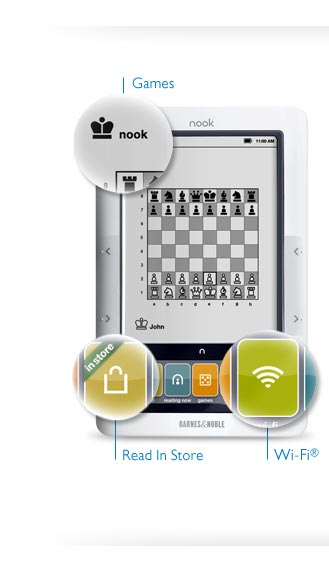
>     If you’re a Nook user like I am, then undoubtedly you were surprised to see an email in your inbox today announcing an available software update (version 1.3) for Barnes and Noble’s e-reader which brings some surprising and fun new features to the table:

  • Read entire books for free – for up to an hour a day, you may read as much of any e-book as you like while you’re in a Barnes & Noble store. This might be a way of getting customers in the door, and I haven’t had a chance to use this feature yet. However, it’s more of a competing feature than Amazon will be able to come up with – as they have no stores, in the physical sense. In addition, this feature more than any other may contribute toward maintaining a literary culture which was once centered around the library, but is now centered around retail establishments. My prediction: Barnes & Noble stores may want to invest in some additional comfy chairs.

  • Games! – chess and Sudoku have arrived on the Nook. While I haven’t had a crack at the Chess yet, I did play a sudoku puzzle and am happy to report that it is not only usable, but it’s fun too. The little color touchscreen at the bottom of the nook displays a 3 x 9 square strip of the puzzle that can be scrolled up and down. Touching an empty square brings up a strip of number buttons and a few more buttons. If you make a mistake, the numbers will show up in red. Very nice for on-the-go reading breaks, I’d wager.

  • Basic web browser – that’s right, you can browse the web on your Nook! As hokey as it may sound, it works better than one might imagine. The screen shows an e-ink version of the web page you’re looking at, while the color touchscreen shows a strip of the page that you can swipe to move around the whole thing. Tapping on a text-entry field brings up that keyboard you haven’t seen since setting up your Nook. I gave it a test drive by logging into my Gmail. Like they said, basic – but good.

    In addition to the aforementioned features, the software update brings enhancements to performance (quicker page turns, faster book loading) and wifi. My guess with the “enhanced wifi” is more support for different wireless security protocols.
    The update downloads and installs in roughly ten minutes. Upon your first reboot after the update, you will notice some extra tiles on the main button bar. There’s one for the games, and one for the browser. In addition, you will find a new wifi button that will allow you to manage wifi connections, as well as activate/deactivate airplane mode without having to go into your settings to do it.
    This update was a pleasant surprise for me. I’m sure that Nook owners all over will agree, and I’m just looking eagerly forward to new features to come in the future. Just a word to those who connect the reader exclusively over 3g: this update is only available over-the-air on wifi connections, but there is a way to do the update from your computer. Read more about it at http://www.nook.com/update.